Defeat Anime RNG Traits: Roll Chances and Crystal Costs
Read observed trait chances, the Superior damage bonus, and the crystal Roll cost in Defeat Anime RNG, with a dated gameplay screenshot and spending tips.
What does the Traits screen show?
The Traits interface lets you inspect a trait on a selected unit, its displayed roll chance, and its effect. In the gameplay frame below, Gowo is labeled Legendary Unit and has Superior, which shows 27.05% Roll Chance and 10% damage increase.
This frame comes from ItzVexo’s guide published on September 13, 2026. We inspected it on September 20. It records the interface visible in that video; we have not independently tested these values on a current game server.
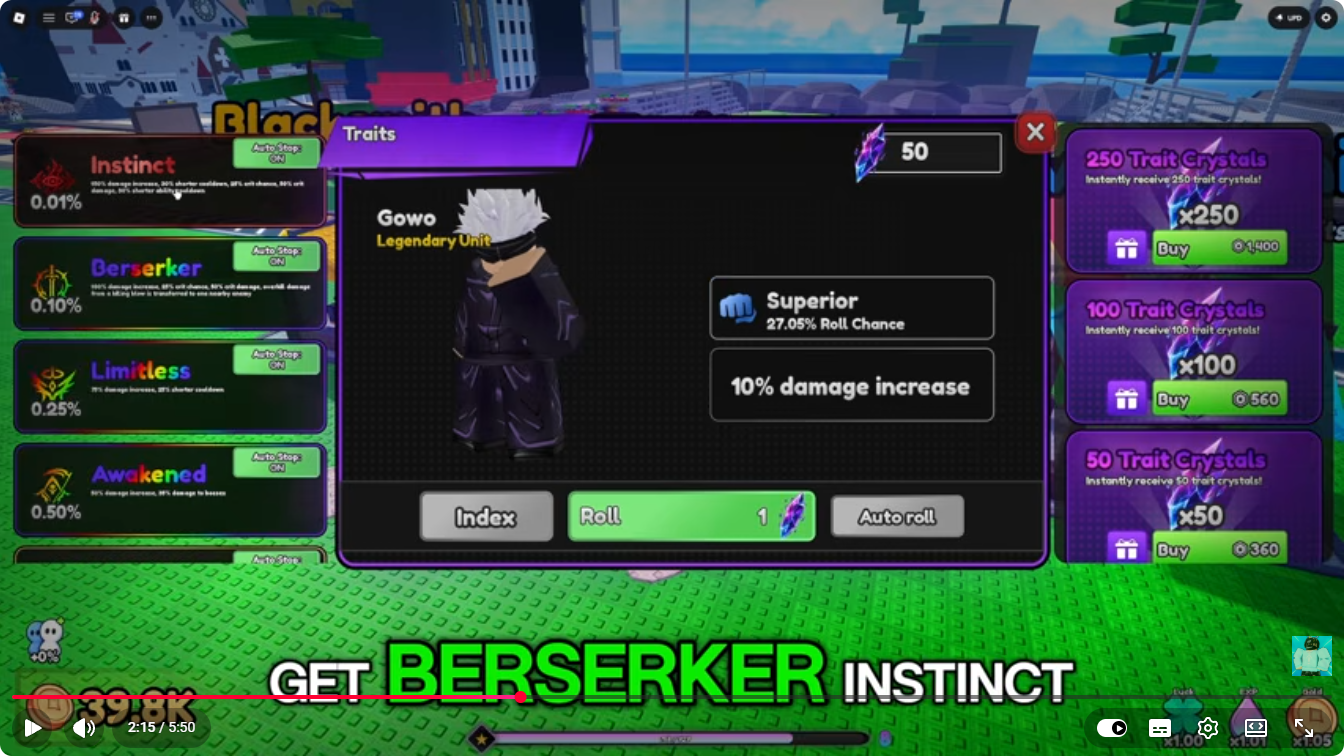
Watch the source video at 2:15 to check the surrounding gameplay. For unit names and rarity labels, use the separate unit reference.
Which trait chances can be read from the frame?
| Trait | Displayed chance | Effect recorded here |
|---|---|---|
| Superior | 27.05% | 10% damage increase |
| Awakened | 0.50% | Not transcribed from the small text in this frame |
| Limitless | 0.25% | Not transcribed from the small text in this frame |
| Berserker | 0.10% | Not transcribed from the small text in this frame |
| Instinct | 0.01% | Not transcribed from the small text in this frame |
This is a partial view of the trait list, not the full probability distribution. Other entries extend below the visible area. The percentages describe traits, not unit rarity, character acquisition, mutation chances, or boss drops.
A smaller displayed chance also does not establish which trait is best for your goal. Compare the full effect descriptions in your current game. Only Superior’s effect is large and clear enough in this frame for us to quote here without reconstructing small text.
How do you approach a trait roll?
Use the visible interface as a checklist before spending crystals:
- Confirm the selected unit. Read the name and rarity at the left of the main panel. In this example they are Gowo and Legendary Unit. Check that you are working on the copy you intend to improve.
- Record the current trait. Read its name and effect before making a change. A screenshot gives you a reference if you later compare your results.
- Check your balance and the button cost. The example shows 50 beside the purple crystal icon at the top and 1 beside the same icon on the Roll button. These are the displayed balance and cost for that player’s screen, not a free allocation promised to every account.
- Read any confirmation before continuing. Decide whether you are willing to change the trait currently shown. Do not spend toward an assumed guaranteed result or an undocumented pity rule.
- Inspect the resulting label and effect. Compare the information the game displays with your original screenshot before committing more resources.
The frame also shows an Autoroll button and Auto Stop ON labels beside several listed traits. It establishes that those controls exist in the recorded interface; it does not show every stop condition or explain how a warning interacts with Autoroll. Check their current settings before using repeated rolls.
Are crystals the same thing as shards?
The shop in this frame explicitly says Trait Crystals, and the Roll button uses the same purple crystal symbol. Meanwhile, third-party code lists describe some rewards as Trait Shards.
Those two names are not enough to prove a rename, shared balance, or conversion rule. After a redemption, check the exact inventory label and whether the balance in the Traits interface changes. The potions and Trait Shards guide keeps media-reported rewards separate from this observed interface.
Keep traits separate from other unit upgrades
Traits, mutations, and unit merging should not be treated as three names for the same action. This screenshot concerns the Traits panel only. It does not establish how traits are preserved when copies are merged, fused, evolved, or cloned.
Before spending a valuable copy, check the merging and levels guide and the mutation guide. Record its trait alongside its other attributes so a later upgrade comparison does not accidentally mix changes from several systems.
Sources and review date
Frame reviewed September 20, 2026. Source: ItzVexo, Defeat Anime RNG GUIDE! (Codes, Tips & Tricks, Get LUCK FAST) ROBLOX, published September 13, 2026; inspected frame at 135.014 seconds. The screenshot supplies the unit label, trait names, displayed chances, Superior effect, crystal balance, button cost, and visible controls recorded above.
These are observations from a dated gameplay video, not a new in-game test or a complete trait database. Our sources and verification policy explains how video observations, code reports, and live checks are distinguished.
FAQ
Does the 27.05% Superior chance mean I can roll Gowo at that rate?
Are Trait Crystals and Trait Shards the same resource?
What does Superior do, and how much does a trait roll cost?
Related Articles
units
Defeat Anime RNG Cloning: Isel, Epic Essence and Timers
Read a real Defeat Anime RNG Clone screen showing Isel, Epic Essence and a countdown, then check the material requirement before starting your own job.
units
Defeat Anime RNG Unit Cards: Names, Rarities and Shown Stats
Search six Defeat Anime RNG unit cards by name and rarity. See Gura and Blood observations, plus Gowo, Isel, Grey and Danji with gameplay sources.
zones
Defeat Anime RNG Zones: Visible Prices and Progression Guide
Compare recorded Planek 5K, Stadium 5.8M and Curse College 29.1M prices, with credited screenshots, zone labels and Stadium drops.
Was this helpful?
Thanks for the feedback!