Defeat Anime RNG Cloning: Isel, Epic Essence and Timers
Read a real Defeat Anime RNG Clone screen showing Isel, Epic Essence and a countdown, then check the material requirement before starting your own job.
What does the Clone interface show?
The gameplay frame below shows a timed Clone job for Isel, labeled Epic Unit. Its material panel reads Epic Essence, with a red 0/11 counter. The main status reads Ready in 06:20, and the bottom controls are -50% Time and Cancel.
This is a concrete view of the system, taken from Berlian kecil’s video published on September 14, 2026. We inspected the frame on September 20. It records what that player saw at the time; it is not a test on a current game server.
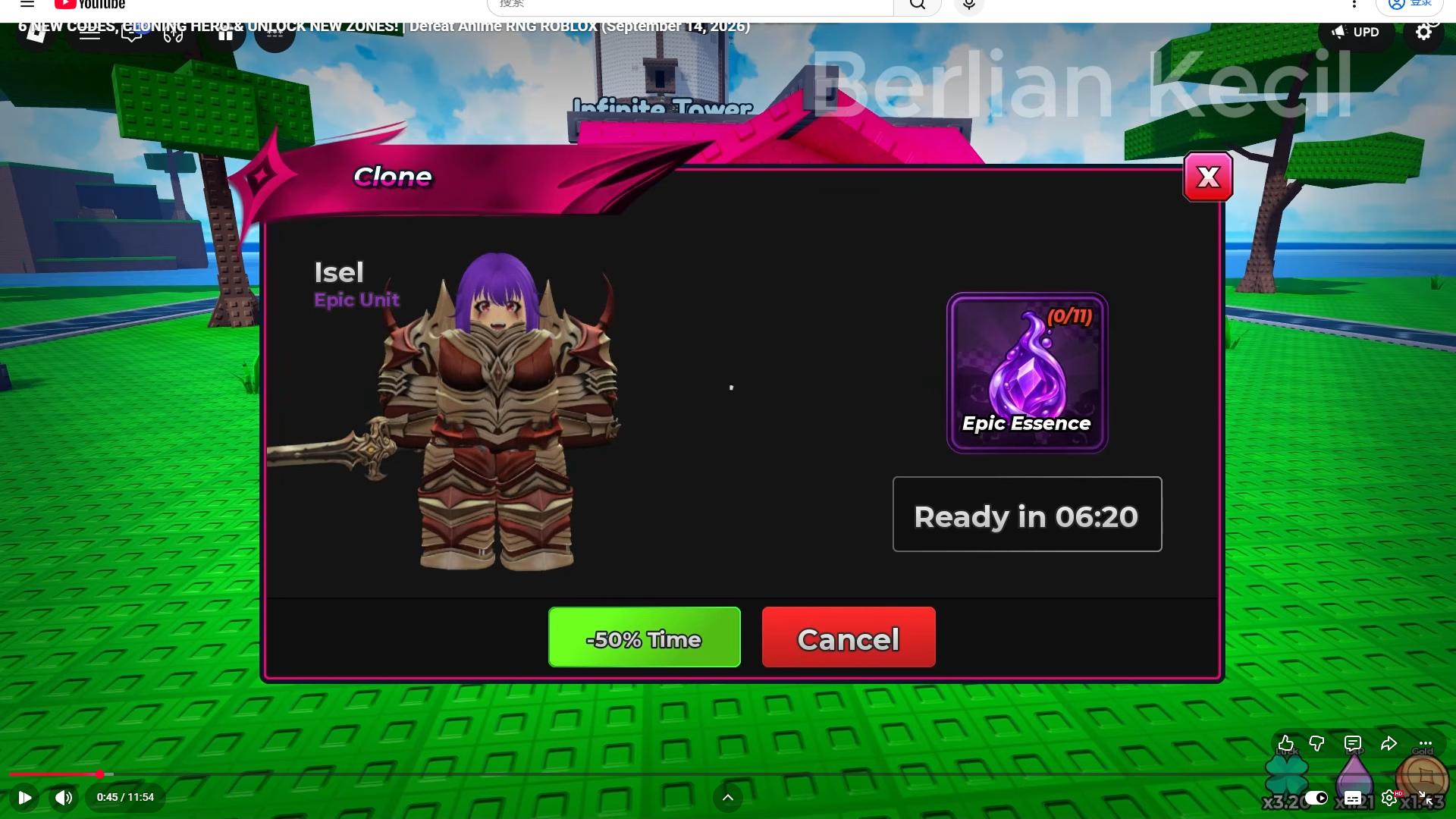
Watch the original video at 0:45 for the surrounding interface. The exact item name in the picture is Epic Essence; the automatic subtitles render it differently, so the on-screen label is the reference used here.
How should you read the material counter and timer?
| Visible detail | What the frame establishes | What it does not establish |
|---|---|---|
| Isel / Epic Unit | The unit selected for this recorded job | A recipe or duration for every Epic unit |
| Epic Essence / 0/11 | The material label and counter displayed during that job | The balance before starting or the exact deduction at confirmation |
| Ready in 06:20 | Time remaining when this frame was captured | The total duration from a fresh start |
| -50% Time | A time-related control exists | Its price, payment type, or conditions |
| Cancel | A cancellation control exists | Whether cancellation refunds materials or preserves all progress |
The creator describes having placed the unit into cloning before this part of the recording. There is no before-start confirmation in the inspected frame. Treat 11 as part of the observed counter, rather than a tested universal recipe, and read your own confirmation before spending.
The unit reference keeps character names and rarity evidence separate from upgrade recipes. That matters when a different unit shows a different requirement.
What should you check before starting your own clone?
- Confirm the unit. Read the selected name and inspect the copy you intend to use. A matching portrait alone is not enough when levels or modifiers differ.
- Read the material name and requirement. Record both before confirming. Epic Essence is the name shown for this Isel job; do not substitute another resource because its icon is also purple.
- Check the initial time estimate. If the current screen provides one, record it before the job begins. A screenshot midway through a countdown cannot supply the original duration.
- Read the confirmation and cancellation terms. Check what the game says will happen to the selected unit and materials. Do not assume that Cancel returns everything.
- Compare the result when the job finishes. Record the exact name, level, displayed stats, mutation, and trait that the game shows. Keep the original record for comparison.
This is an inspection checklist, not a claim that the source video tested every confirmation or cancellation outcome. If your current interface differs, use its instructions and keep a screenshot of the change.
How is cloning different from other unit decisions?
The visible Clone screen has its own material panel and timer. Keep that decision separate from merging and levels, which concerns combining units, and Traits, which has a different rolling interface and displayed currency.
Likewise, a unit’s mutation label is a property to inspect, not proof of what a clone will retain. The mutation guide explains how to compare copies without mixing a level difference with a modifier effect.
If you are preparing resources, the potions and Trait Shards guide distinguishes reported reward names from verified interface observations. This cloning frame supplies no evidence that Trait Shards, Trait Crystals, and Epic Essence are interchangeable.
Sources and review date
- Berlian kecil: 6 NEW CODES, CLONING HERO & UNLOCK NEW ZONES!, published September 14, 2026; inspected at 0:45 on September 20, 2026. The description links to the official experience, place ID 92606991708989.
- Official Defeat Anime RNG experience, used to identify the game.
- Sources and verification policy, covering the distinction between a historical video observation and our own current-server test.
The preserved frame includes the creator’s watermark. No material cost, total timer, refund rule, or modifier-preservation rule is added where the inspected evidence does not establish it.
FAQ
What material does the recorded Isel clone use?
Does cloning always take 6 minutes and 20 seconds?
Will a clone keep my mutation, trait, and stats?
Related Articles
units
Defeat Anime RNG Traits: Roll Chances and Crystal Costs
Read observed trait chances, the Superior damage bonus, and the crystal Roll cost in Defeat Anime RNG, with a dated gameplay screenshot and spending tips.
units
Defeat Anime RNG Unit Cards: Names, Rarities and Shown Stats
Search six Defeat Anime RNG unit cards by name and rarity. See Gura and Blood observations, plus Gowo, Isel, Grey and Danji with gameplay sources.
zones
Defeat Anime RNG Zones: Visible Prices and Progression Guide
Compare recorded Planek 5K, Stadium 5.8M and Curse College 29.1M prices, with credited screenshots, zone labels and Stadium drops.
Was this helpful?
Thanks for the feedback!